Animated Login Form Using HTML & CSS
by Letscode - October 4,2023
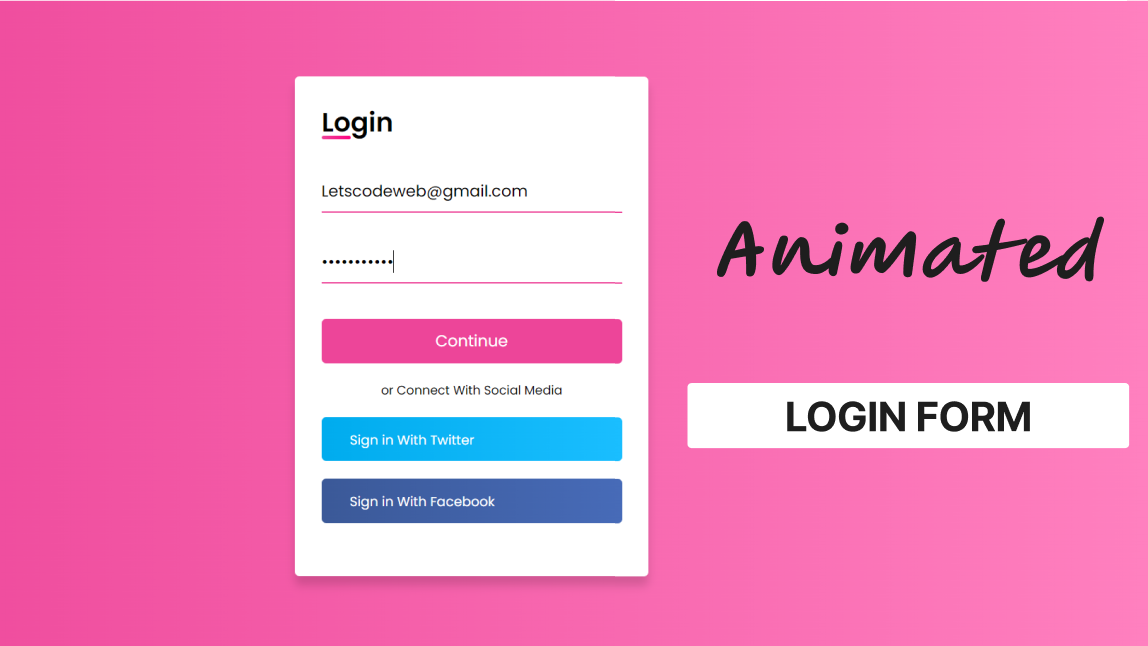
Q: How can we create a simple login page using HTML and CSS?
A: After reading and watching the following article and video tutorial, you will definitely know how to create a login form using HTML and CSS. Hello, Readers Today in this blog I’m going to create an Animated Login Form by using HTML & CSS only. In my earlier blog, I have Shared How to create a Responsive Footer Section for Webpages, now it’s time to design a login form.
What is a Login Form?
In simple language, a login form is a form where users need to enter his/ her email and password to enter a particular webpage. We can take the example of Instagram. In Instagram when we are going to enter our Instagram, first of all, we need to enter our email address and password, that form is called the login form. There are various designs of login form but its main work is the same.
What should a login page have?
There are lots of things that we can add to the login form, some of the important points I have given below:
- Username field.
- Email field.
- Phone number field.
- Password field.
- Forgot the password link.
- Submit button.
- Show password/hide option.
- Alternative login options (Facebook, Twitter, Gmail)
As you can take a look at the image of a login form which I have given on the webpage. is also a login form. Today we will build this login from in this program. As you can see, I already have filled in my email and password in this login form. Also, we can see two social media buttons for Facebook and Twitter. Users can log in through these two social media buttons.
If you are feeling difficulty to understand this program. You can see the full video tutorial of this program [Animated Login Form]. I hope all your confusion will clear after watching this tutorial on a login form
Animated Login Form Using HTML & CSS | [Source Code]
you can download the source code files for this Animated Login Page for free by clicking on the download button,

Most Popular



Recent Posts
-

Image Slider in HTML CSS and JavaScript
Letscode - October 4,2023
-
Facebook Login Page Using HTML & CSS
Letscode - October 10,2023
-

Amazon Website clone in HTML & CSS
Letscode - November 4,2023
-
Custom Captcha Generator in HTML CSS and JS
Letscode - October 24,2023